Appearance
Control Philosophy (Skeleton PDF)
A functional-description skeleton generated from the drawing: scope, equipment operating modes, every ISA loop, an alarm table, an interlock table and a list of open items. It fills in what the drawing records and prints TBC everywhere else. It never guesses a control action, an alarm limit or an interlock.
The point of the skeleton is to remove the typing, not the engineering. What comes out is a document with the right shape and the right tags, and with each decision you still have to make visibly marked as outstanding.
Where it is
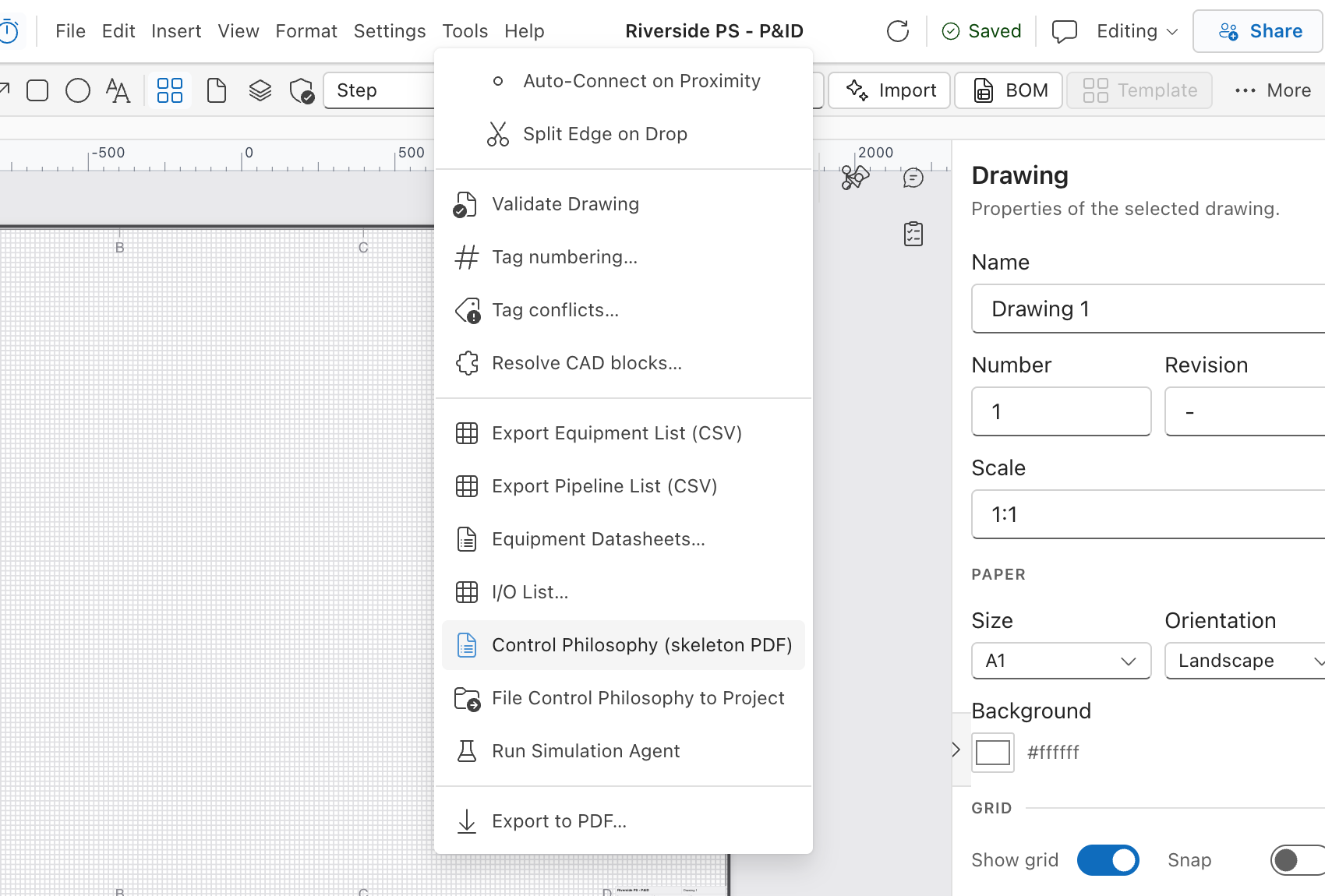
Menu bar → Tools → Control Philosophy (skeleton PDF).
The drawing is saved first, then the PDF downloads as control-philosophy-<drawing>.pdf. You get the toast:
Control philosophy skeleton downloaded — complete every TBC before issue
Other outcomes:
| Toast | Why |
|---|---|
| Save the drawing before generating its control philosophy | The drawing has never been saved, so there is nothing on the server to read. |
| Could not generate the control philosophy | The save or the download failed. Try again. |
What is in the PDF
The first page carries the project, drawing name and drawing number, a SKELETON marker, the generation timestamp, and a call-out that repeats the rule the document follows: it states only what the drawing records, and everything else is TBC for the responsible engineer. Every page footer reads "Skeleton generated by ErgoPlanner from the drawing — not for issue until every TBC is closed".
No screenshot: the generated PDF is a download, not an in-app screen; the SKELETON marker and call-out are described above.
| § | Section | Built from |
|---|---|---|
| 1 | Scope | Counts: driven equipment items, instruments, loops. |
| 2 | Equipment operating modes | One row per tagged driven equipment item: Tag, Description, Duty, Operating mode. |
| 3 | Control loops | One block per ISA loop. |
| 4 | Alarms | One row per analog input: Tag, Description, Range, LL, L, H, HH. |
| 5 | Interlocks and trips | One row per switch: Initiator, Description, Condition, Action. |
| 6 | Open items | Everything the drawing left unanswered, as a bullet list. |
§2 — Operating modes from duty
The Operating mode sentence is derived from the element's duty property alone, and it never states a start condition:
duty | Sentence |
|---|---|
duty | Duty unit. Starts / stops on: TBC. Permissives: TBC. |
standby | Standby unit. Auto-starts on duty-unit fault: TBC. Permissives: TBC. |
duty/standby | Duty / standby set. Duty rotation (run hours or calendar): TBC. Changeover on duty fault: TBC. |
lead | Lead unit. Starts at: TBC. Lag unit brought in at: TBC. |
lag | Lag unit. Starts when the lead unit cannot meet demand: TBC. |
| not set | Operating mode: TBC. Starts / stops on: TBC. Permissives: TBC. — and the item is listed in §6. |
§3 — Loops
Instruments are grouped by ISA loop number (authored loopNumber, else the numeric part of the tag). Each loop gets a heading naming the loop, its variable and its kind — closed-loop control, protection / status, remote-operated final element or monitoring — then a table:
Measurement, Controller, Final element, Setpoint, Range, Fail action, Equipment.
A dash means the loop genuinely has no such member on the drawing. TBC means the loop has one and the value is missing. Below the table, one narrative sentence restates the loop in prose, carrying the same TBCs — for a closed loop, the control action (direct/reverse) and tuning are always TBC, and the fail action is only stated when the element's fail_action property says so.
§4 and §5 — Alarms and interlocks
Both tables are generated from the same classification as the I/O list: every AI point becomes an alarm row, every DI point from a switch becomes an interlock row, with its condition read off the ISA suffix (HH → high-high, LL → low-low, H → high, L → low, otherwise change of state).
All four alarm limits are printed TBC, every interlock Action is printed TBC, and §5 always ends with a standing row — "Process interlocks not shown on the drawing" — because an interlock that exists only in someone's head cannot be read off a P&ID.
§6 — Open items
Written as the document is built. Typical entries:
- Instrument X has no ISA tag — it is not in any loop.
- Loop 101 has no primary element or transmitter (V-003).
- Loop 101: controller FIC-101 has no final control element on the drawing.
- Loop 101: fail action of FCV-101 not stated.
- P-101: duty arrangement (duty / standby / lead / lag) not stated.
When nothing is found, §6 says "None found on the drawing. The TBC entries above remain open." — an empty open-items list is not a complete document.
Filing it in the project
File -> File Control Philosophy to Project saves the drawing first, then files the generated skeleton as a project document: the first time it is rev A, and each later filing adds a new revision (the confirmation reads Control philosophy filed as rev N). This is the evidence the Stage 2 control-philosophy check looks for in the project stage gate. The drawing must be saved before it can be filed.
What this does not do
- It does not write control narrative. Control actions, tuning, alarm and trip settings, permissives, start/stop conditions, sequences and modes of operation are printed TBC. Nothing is estimated, interpolated from similar plants, or filled in from a template.
- It is not drafted by AI. There is no LLM in this path at all. Every sentence is generated deterministically from the drawing.
- PDF only. No Word/DOCX output, so there is no editable version to mark up in place — you take the PDF as the structure and write the real document alongside it.
- The download is not filed. The PDF download is only a copy on your machine. To put the skeleton in the project, use File -> File Control Philosophy to Project (below).
- It does not know about alarms or interlocks that are not on the drawing. The alarm table is a list of candidates (your analog inputs), not a rationalised alarm schedule.
- It reads the last save. The menu item saves first, so this is rarely visible; a generation taken while a save is failing describes the older drawing.
- It needs ISA-shaped tags. Instruments without one form no loop and are listed in §6 instead.
See also
- I/O List — the classification §4 and §5 are built from
- What Does a Change Affect? — which loops and modes mention a given element
- Server-Side Validation —
V-003, the rule that produces the loop open items