Turn a DXF or DWG into a live P&ID model.
CAD import is mapped, not guessed. Scan and PDF recognition is a preview: review everything.
Try it with a sample plantWhat this replaces
The plant exists and the drawings exist, and neither of them is a model. What you have is a scan of a sheet somebody inked in 1994, a PDF printed from a CAD file nobody can find any more, and a DWG whose block names meant something to the contractor who drew them.
So the model gets rebuilt by hand, symbol by symbol, by an engineer who is not really checking the plant against the drawing — they are retyping the drawing into a different tool, and the second copy is wrong in new places.
Decades of drawings locked in PDFs
Redrawing legacy plants by hand
No live record of an existing site’s equipment
A default recognition run makes no call to any language model and sends nothing off your server — and nothing it proposes reaches your drawing until you place it.
How it works
- Upload
- The pipeline proposes
- You accept or reject
- Placed in the model
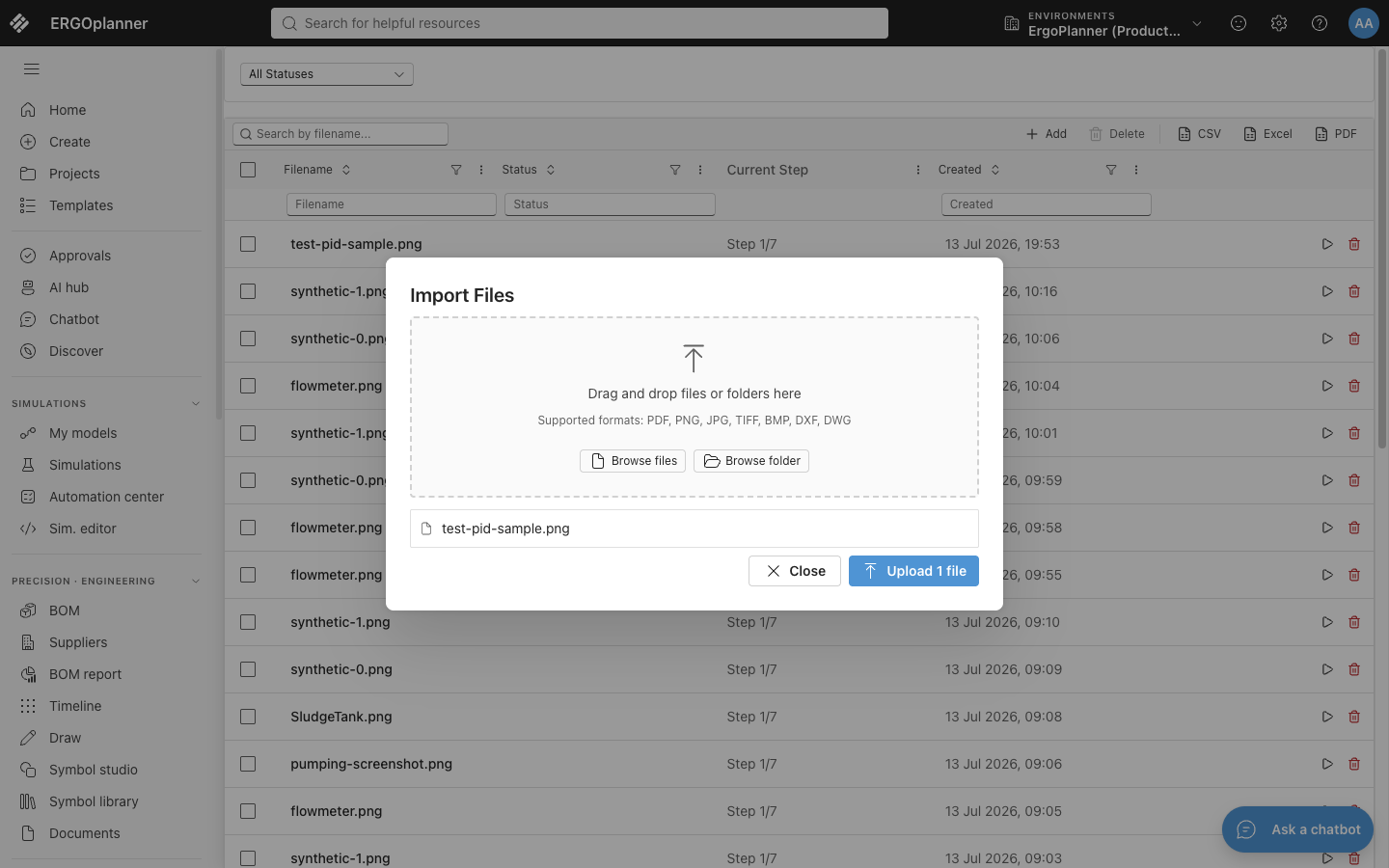
The upload box names the formats it takes, and the table behind it is every import session with the step it has reached — so a file that stalled is visible rather than lost. A CAD file and a scan both enter here and take different paths from the next step on.
What you get out
- A live model — every placed proposal becomes a model element, tagged and connected
- An editable P&ID sheet
- Tag register export (CSV) — RFC-4180, per project, the first 10,000 history rows
- A reusable template, generated from the recognised sheet
- Your corrections (ZIP) — cropped images and labels; nothing is retrained from them yet
Recognition output is a set of proposals, not a finished model. A competent engineer reviews, adjusts or rejects each one before it is placed.
What actually runs, and where
The default run, on your own hardware
Symbol detection is an ONNX model executed in-process by the .NET runtime on CPU: no Python at runtime, and no outbound HTTP on that path. Downloading model weights is opt-in and unset, so a default deployment does not fetch anything either, and a test in the suite exists to assert that a recognition run makes no network call at all.
The panel that starts a run cannot ask for the language-model stage — it forces that option off — and if a request ever arrived with it set, two independent server-side flags, both shipping disabled, would reject it before a single pixel was read. For a site whose drawings cannot leave the building, that question is answered by the default rather than by a configuration somebody has to get right.
The CAD path is a mapping table, not a detector
A DXF or DWG file is not guessed at. Block inserts are matched against a mapping table using case-insensitive glob patterns evaluated in priority order, attribute conditions are checked once the pattern matches, and an equipment tag is read from the first of five named block attributes that carries one.
Blocks that match nothing are not invented into symbols: they are collected as unmapped, with a count of how many times each one occurred. Reviewing a CAD import is therefore reading a mapping table, which is a different and much shorter job than second-guessing a statistical detector.
What a proposal is, and what accepting one does
Every detection is stored as a hotspot carrying its own provenance — detected by the model, matched from a stencil, recovered from an OCR tag, proposed by segmentation, or drawn by you — and one of five statuses. Accepting marks that row identified, rejecting marks it rejected and skipping marks it skipped, and none of those three touches your drawing.
Placing is the separate act that writes to the model, and it is the only one that does. That is also why a rejected proposal is discarded from the drawing rather than from storage: its row stays in the import session, marked rejected, until you re-run recognition on that sheet.
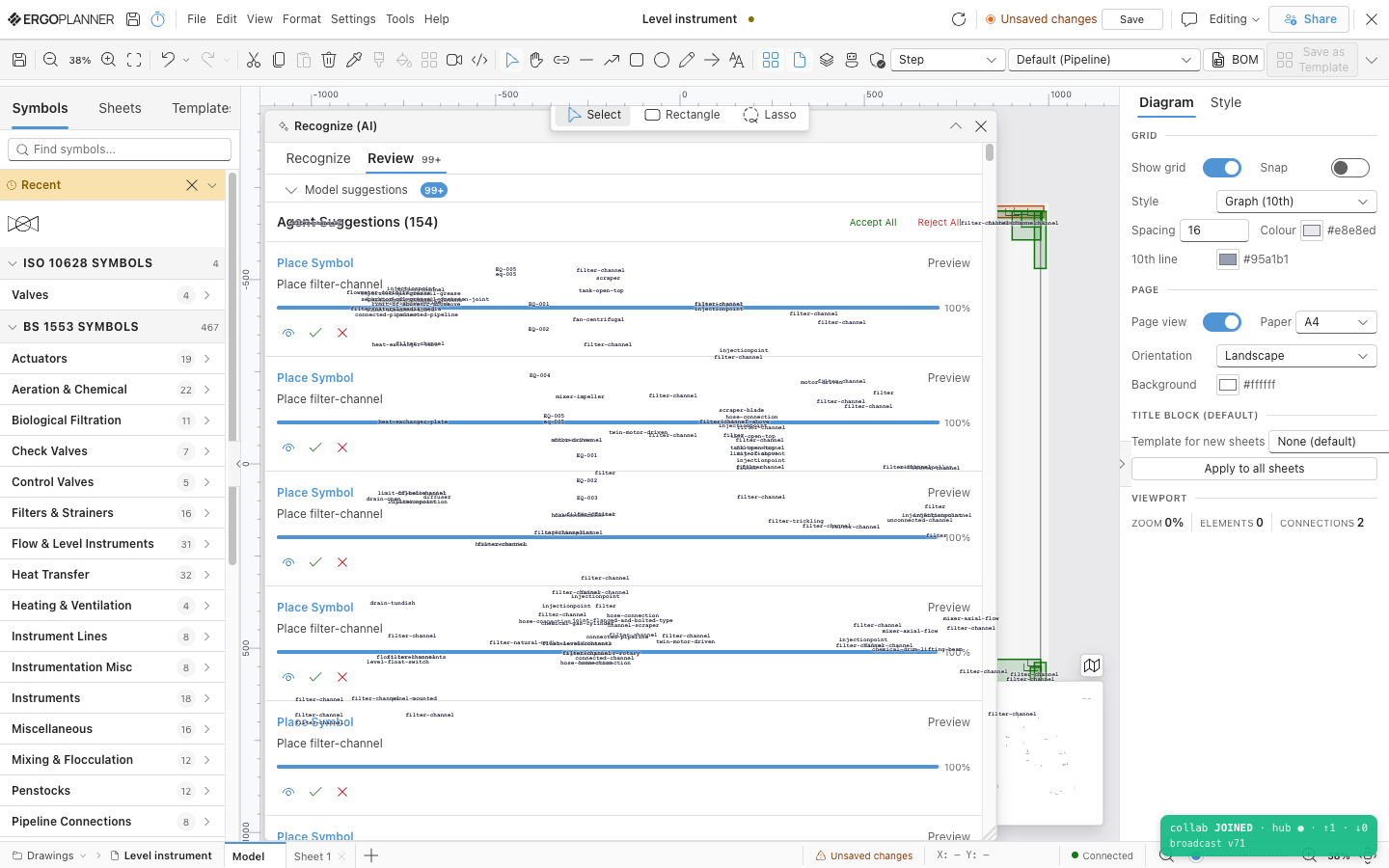
Review happens over the sheet itself, inside the drawing editor: one row per proposal, each with preview, accept and reject, and Accept All and Reject All across the selection. The percentage on a row is the matcher’s own score for that proposal — it is not an accuracy figure for the product, and this page publishes none.
What it is built to
- Every proposal is reviewed before it is placed — no unreviewed output ships to the model
- DWG is parsed natively, not converted through DXF first
- ISA S5.1 — an OCR-read tag prefix is classified against a prefix table, longest prefix first
- SHA256 — the detector model file is verified against a pinned digest at load, and a file that does not match is refused
Why this is not a drawing-conversion service
A conversion service takes your drawing, runs it on somebody else’s hardware, and hands back a result you are expected to trust. This does neither of those things, and the second one is the more important.
The default pipeline runs inside your own deployment, on CPU, with the language-model stage disabled by two independent flags that both ship off and a test asserting the run makes no network call. You are not trading confidentiality for recognition, and there is no data-processing agreement to negotiate before you can try it on a real sheet.
Two quite different things happen behind one upload box, and conflating them is how a CAD import ends up reviewed as carelessly as a scan. A block matched by pattern is a deterministic mapping you can audit line by line; a symbol found on a raster sheet is a proposal, and nothing here pretends the second is the first.
The grid, the bulk actions across a selection, the propagation of one identification to its lookalikes and the inline editing of symbol and tag all exist because checking the output is the actual work. None of it is designed on the assumption that the detector is usually right.
What it does not do
Six things you would find out in the first week anyway. A recognition product that will not state them up front is asking you to take the interesting parts on trust.
- Scan and PDF recognition is a previewReading a scanned sheet or a PDF is built end to end, but it is not yet accurate enough on real drawings to rely on without checking every symbol, and the next detector is not shipped. Treat each proposal as a suggestion. CAD import (DXF and DWG) is the dependable way in today.
- No accuracy figure, deliberatelyWe publish no recall, precision or accuracy number for this product and do not intend to. The detector’s validation scores were measured against a public catalogue of textbook drawings rather than field sheets, so quoting them would tell you nothing whatsoever about your drawings, and the honest alternative to a misleading number is no number at all.
- A multi-page PDF gives you symbols onlyEvery page of a multi-page PDF is rasterised and run, but through a deliberately reduced path that is the symbol detectors alone. OCR, line detection and topology reconstruction are excluded from it, so a multi-page import comes back as proposed symbols with no tags and no connections, while a single sheet takes the full pipeline.
- CAD import reads model space, and six kinds of geometryPolylines, lines, arcs, circles, two kinds of text and block inserts are read; splines, ellipses, hatches, dimensions, leaders and solids are not, and paper space is ignored entirely. Nothing warns you about an entity that was dropped, so a drawing built largely from splines arrives much thinner than it looked in your CAD package.
- Your corrections do not improve anything yetCorrections can be exported as a bundle of cropped images and labels in the format a detector is trained from, and no model in this product has ever been retrained from one. The loop is captured and open rather than closed, and a plain bulk accept records no correction at all unless you also changed the symbol, the label or the geometry.
- A re-run starts the machine detections overRunning recognition again on the same sheet deletes the previous machine-detected proposals and their connections before it begins, so any review decisions still sitting on those rows go with them. Hotspots you drew by hand are kept, because they carry a different provenance from the machine’s.
Technical capabilities
Questions people actually ask
Does my drawing leave my server?
No. A default recognition run makes no call to a language model and no outbound request of any kind: symbol detection is an ONNX model executed in-process on CPU, OCR is Tesseract, and line detection is classical computer vision. The language-model stage exists, is disabled by two separate flags that both ship off, and a request that asks for it is rejected before any image is read.
Does ErgoPlanner publish a recognition accuracy figure?
No, and that is a decision rather than an omission. The scores the detector was validated against were measured on a public catalogue of drawings, not on field sheets, so they would not predict anything about yours. We lead with the review step instead: every proposal is checked by an engineer before it is placed.
Is DWG really supported, or only DXF?
Both. A DWG is opened directly rather than converted to DXF first, and it takes the same deterministic path: block inserts matched against a mapping table by pattern, tags read from named block attributes, and anything unmatched reported as unmapped with a count rather than guessed at.
What happens to a proposal I reject?
It is never placed in your drawing. The row itself stays in the import session marked as rejected — discarded from the model, not from storage — and it goes when you next re-run recognition on that sheet. Nothing is written to your drawing model until you place something.
Do my corrections make the recognition better over time?
Not yet, and we would rather say so than imply otherwise. Corrections are captured and can be exported as cropped images with labels, in the format a detector trains from, but nothing in this product has been retrained from that bundle and there is no automatic loop behind it.
Try it on a drawing you would not email to anyone.
Upload one sheet, look at what the pipeline proposes, and reject half of it. That is the honest way to find out what it is worth on your drawings.