Design, Build and Hand Over on One Live Model.
Ergoplanner keeps one digital source of truth for your plant. P&IDs, Bills of Quantities, equipment datasheets and transmittal packages are generated from the same model.
/TWO WAYS IN/
Starting from nothing, or starting from drawings you already have?
- BRIEFthe brief, in plain language
- Pumping station
- 2 duty + 1 standby
- 45 l/s at 18 m head
- screened inlet
- RANKranked by confidence
- 1 Pumping station
- 2 Wet well + screen
- 3 Booster set
- CHOOSEone confirmed
- 1 Pumping station
- 2 Wet well + screen
- 3 Booster set
- CASCADEproject parameters
- Q 45 l/s H 18 m
- pipe · pump · motor
- DN 200 15 kW
- COMPOSEtemplate placed
- beside the inlet already drawn
- interfaces joined
- BoM lines 36
- Brief
- Rank
- Choose
- Cascade
- Compose
The template lands beside what is already on the drawing, the declared interface points join, and the bill of materials follows on its own.
Describe the process. Get a first draft to review.
Templates compose a first draft from a plain-language brief: candidates ranked, one confirmed, your project parameters cascaded through its calculation graph, and the result placed with its interface points joined to what is already on the drawing.
See the P&ID editor/THE CATEGORY/
What is an intelligent P&ID?
On a CAD drawing that record lives in the eye of the reader. The file holds lines, arcs and text. A pump is a group of strokes a person recognises as a pump, and the tag beside it is text that happens to sit nearby. Nothing in the file knows the two belong together, or where the line leaving the pump arrives.
On an intelligent P&ID each of those is an object. The pump is an element with its own identity, a tag and a set of attributes. The line is a connection with a direction, a source and a target. The sheet you look at is a view of that structure rather than a picture kept alongside it.
Read the long answerIt has an identity, and a tag that is not just text
An element carries its own id, the symbol definition it was placed from, and an equipment tag held as a field on the element — not as a label that happens to be drawn next to it. Move the symbol and the tag is still its tag.
It carries attributes
Each instance holds its own property map — size, material, duty, whatever the discipline needs. Two valves placed from one symbol are two different objects with two different sets of values.
It is connected, and the connection knows which way it runs
A connection is a directed link from a port on one element to a port on another, carrying its own line type and line tag. Held together they are a graph, which is why "what is upstream of this" becomes a question the model can answer instead of something you trace with a finger.
/WHY/
What goes wrong today
Engineers waste months redrawing P&IDs, reconciling spreadsheets, and manually maintaining consistency across disciplines. Four questions make it concrete — ask them of a drawing you already have.
- /01/
How many DN100 gate valves are on this sheet?
On a CAD drawing: Count them by eye, or trust the last count.
- /02/
What feeds this tank?
On a CAD drawing: Follow the line across the sheet yourself.
- /03/
Swap a pump for a bigger one.
On a CAD drawing: Erase, redraw, then find every other sheet it is on.
- /04/
Where did this bill-of-materials line come from?
On a CAD drawing: Someone typed it. The link is in their head.
/HOW WE HELP/
One model. Every deliverable. The full lifecycle.
From concept design through detailed engineering, procurement, construction, and into operations and maintenance, Ergoplanner maintains a consistent digital source of truth. P&IDs, Bills of Quantities, equipment datasheets and transmittal packages are generated from the same model — less rework, and one set of tags every discipline shares across the project lifecycle.
Intelligent P&ID Model
Design your plant from a structured engineering model — not a drawing tool. Start greenfield or import existing projects. Every P&ID is a live view of your design: change the model once and every sheet shows it, the bill of materials re-generates on save, and any datasheet it affects is flagged for reissue.
Explore the editorBill of Materials
A bill of materials that updates when the drawing does. The model is the take-off: quantities move when it moves, and nobody re-types them. It exports as XLSX and PDF, with costed lines that name the rate card each rate came from, and a purchase-to-decommissioning lifecycle event on every line.
See the bill of materialsSafety studies
HAZOP, LOPA, SIL, FMEA and DSEAR, run against your P&ID rather than a spreadsheet beside it. HAZOP, LOPA, SIL and FMEA export their reports as PDF — HAZOP and FMEA their worksheets too — and DSEAR is held in the tool for now. Every action raised lands in an action register and is tracked on the asset afterwards, with an owner and a due date. All five start on the Professional plan.
See the safety studiesDatasheets and transmittals
Equipment datasheets and transmittal packages, generated from the model. Datasheets bind to element, BOM and simulation data on demand, across eleven equipment families. Transmittals zip what you send with an ISO 19650 cover sheet, hash the package, and track it to acknowledgement.
See datasheets and transmittalsAdvanced Templating
Reusable process templates and equipment configurations accelerate every project. Define a treatment train once, place it anywhere in your organisation, with parameters set per placement. Templates carry forward typical specifications and proven layouts.
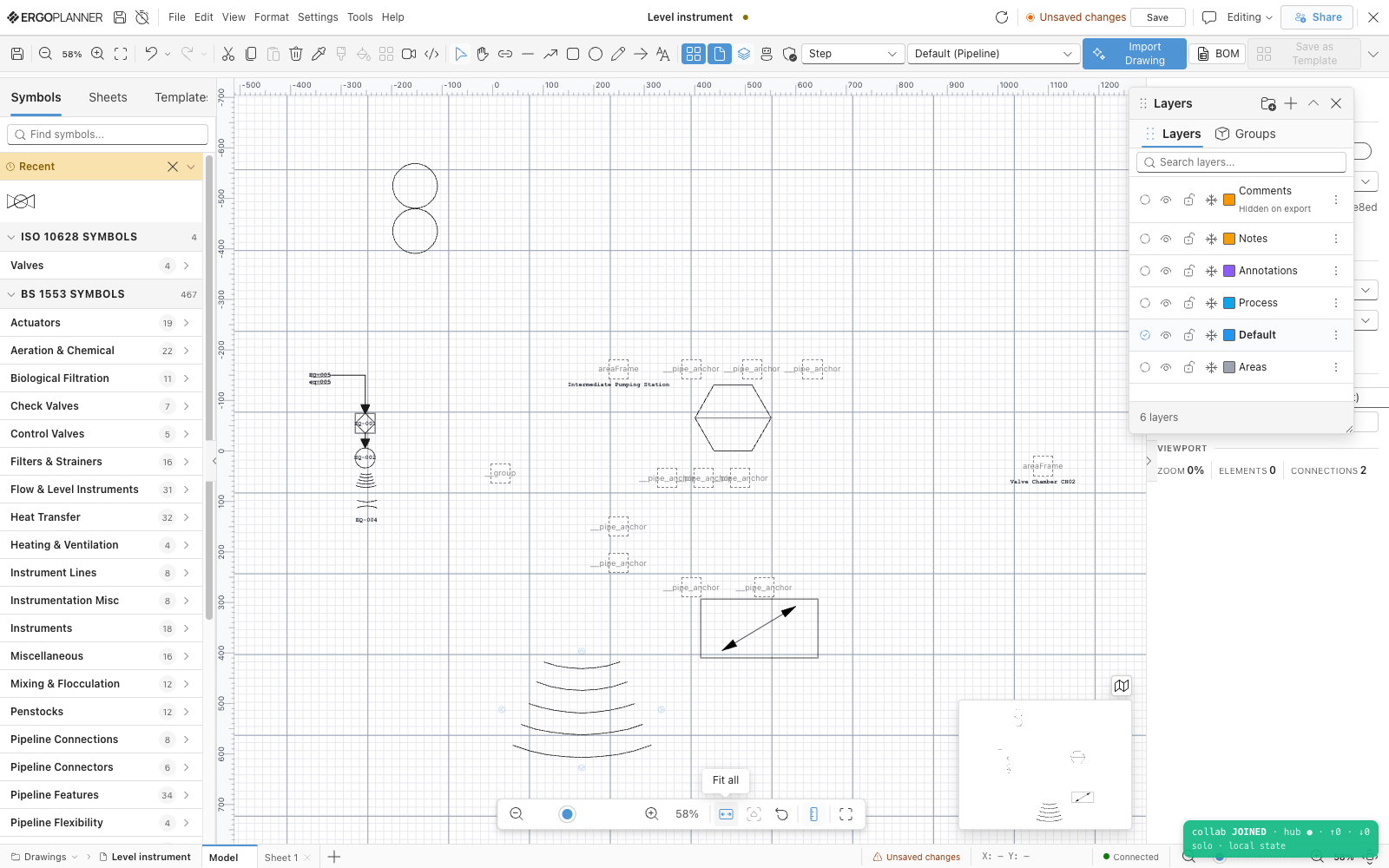
View templates
Real-Time Collaboration
Every discipline works on the same model, always in sync. Process, mechanical, electrical, and I&C engineers see changes as they happen — with conflict-free concurrent editing, named versions and an automatic revision trail. Work that needs another pair of eyes goes out as a request and comes back decided.
Learn about collaborationLive Asset Visibility
Every tagged item, its properties and its lifecycle status — purchased, installed, inspected — in one register. Bill of Materials tracks quantities as you design. Run simulations directly from the model to validate performance before construction begins.
Explore visibilityThe foundation: your intelligent engineering model that lives with your plant.
Not just for design. For the life of your plant.
Most P&ID tools serve the design phase. Ergoplanner is built for the whole asset lifecycle — from the first feasibility study into operation and maintenance.
The engineering model lives with your plant through every phase. Design your P&IDs during feasibility. Refine them through outline and detailed design. Issue construction packs with immutable revision snapshots. Update to as-built after commissioning. Then use the same model as your asset register, and for the equipment datasheets you reissue. When it's time to upgrade, the model is already there. No re-surveying. No re-drawing. No starting from a blank page. Just continue where you left off.
Hover a phase to see which agents help
What type of project?
New plant. Blank brief.
Describe your process requirements in plain language, and matching templates come back ranked; confirm one and your project parameters cascade through its calculation graph, sizing what it places. The Drawing Agent proposes the symbols and lines you ask it for, and places them only once you accept. The bill of materials follows the drawing from then on, and the model grows with the project from feasibility through to handover.
Upgrade. Extend. Refurbish.
Import your existing P&IDs (DXF/DWG) and every mapped block becomes a tagged element of a live model; blocks with no mapping are kept as placeholders for you to resolve once, and the mapping is remembered. Design your upgrade on top of the existing model, with existing and new kept apart through to the bill of materials.
Maintain. Reissue. Manage.
Your as-built model becomes your operational asset register. A datasheet whose model data has moved is flagged for reissue, and anything you issue goes out as a transmittal package that records what was sent and to whom. Named versions are kept, so an earlier state of the plant can be compared and restored. When the next upgrade comes, you start from the record you kept.
/THE ARTEFACTS/
What it actually produces
Seven screens of the running application, captioned with what is on them. The figures in the captions are the figures on the screens — they are not benchmarks, and nothing here is a mock-up.
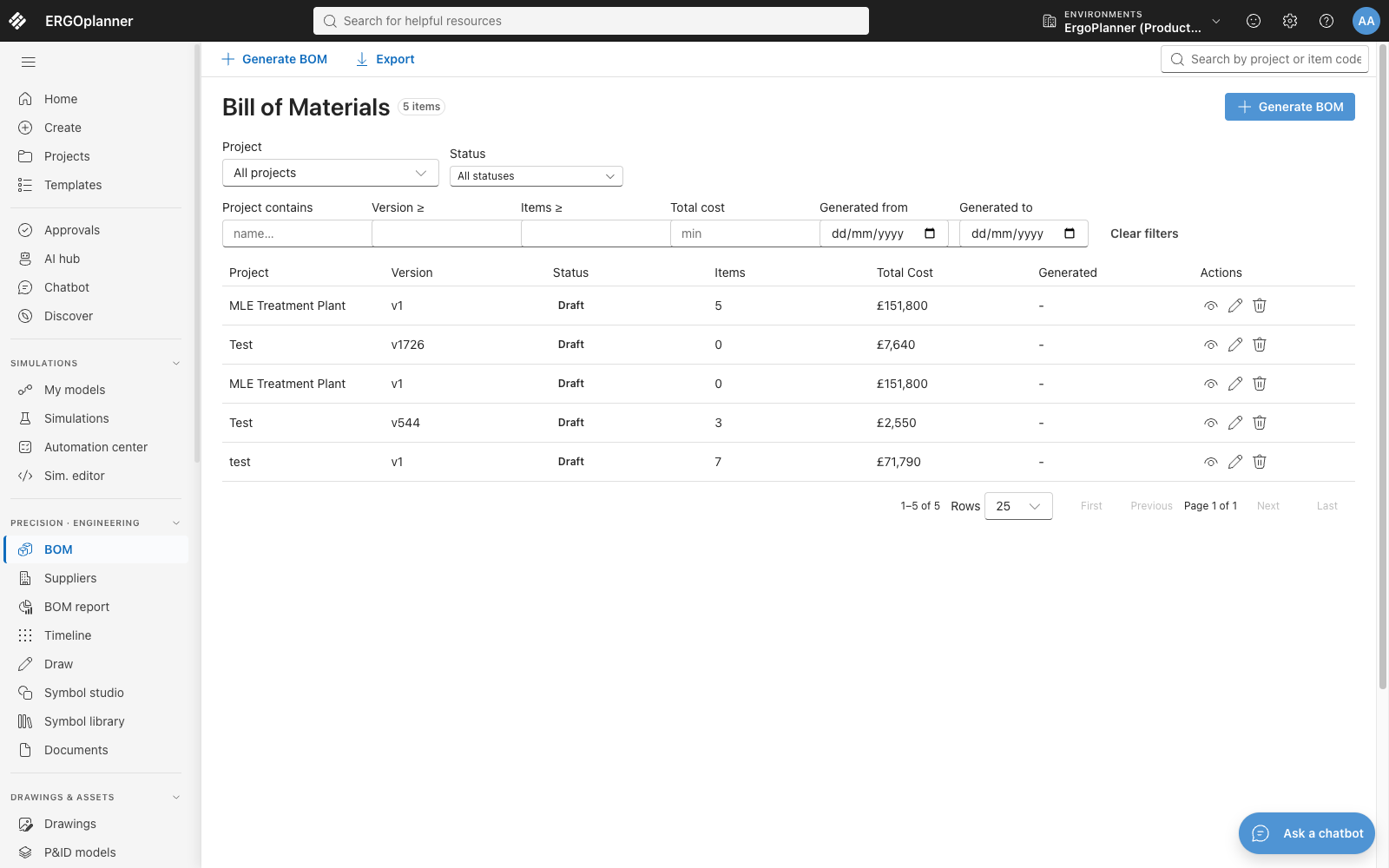
The register of generated bills: one row per bill with its project, version, status, item count and total cost. Each one was generated from a drawing rather than typed, and exports from this screen.
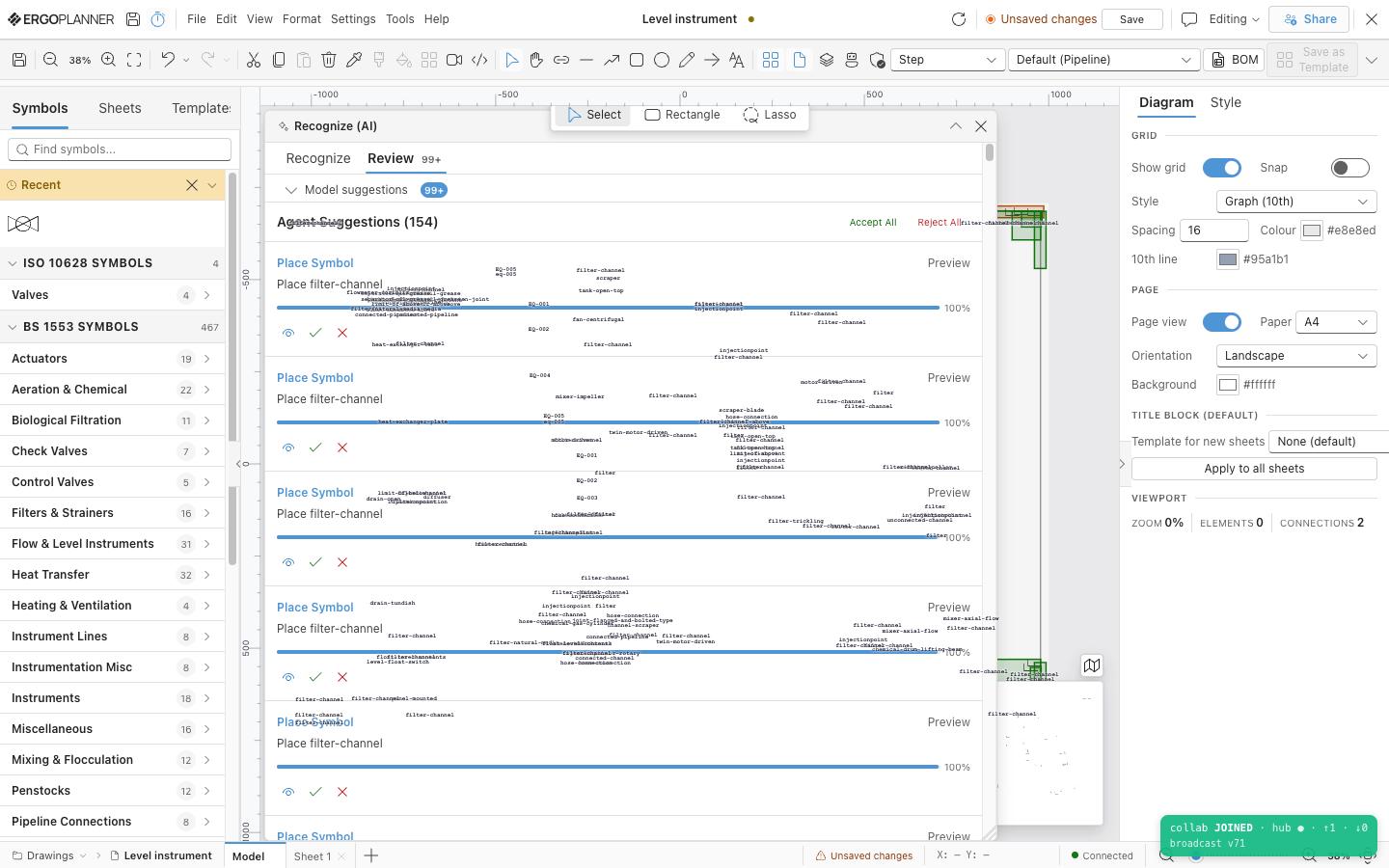
154 proposals from one imported drawing, each with an accept and a reject button. Nothing on this list is in the model yet — a rejected proposal is discarded and never placed.
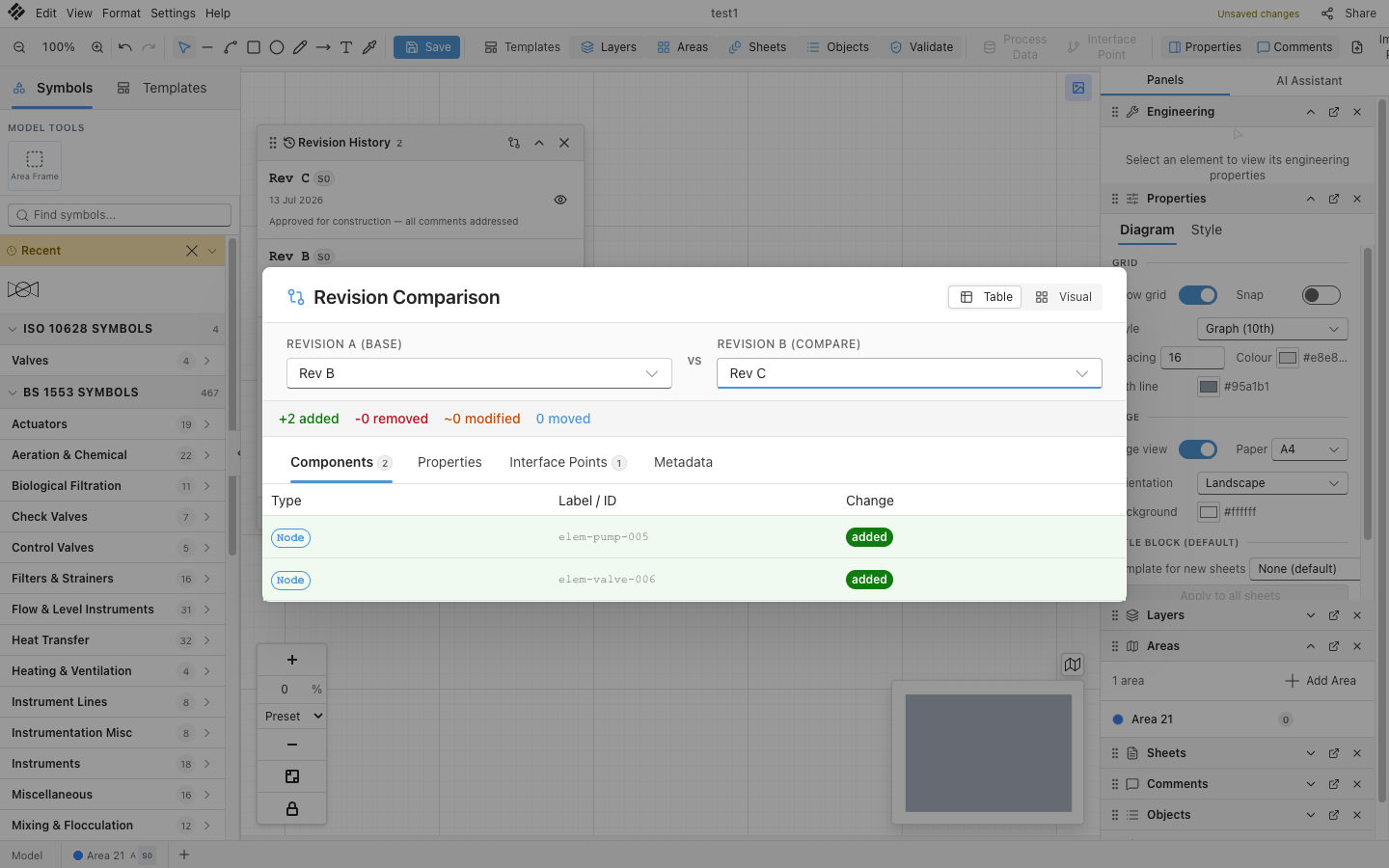
Rev B against Rev C, counted rather than eyeballed: +2 added, -0 removed, ~0 modified, 0 moved, with the two added elements named. Components, properties, interface points and metadata each get their own tab.
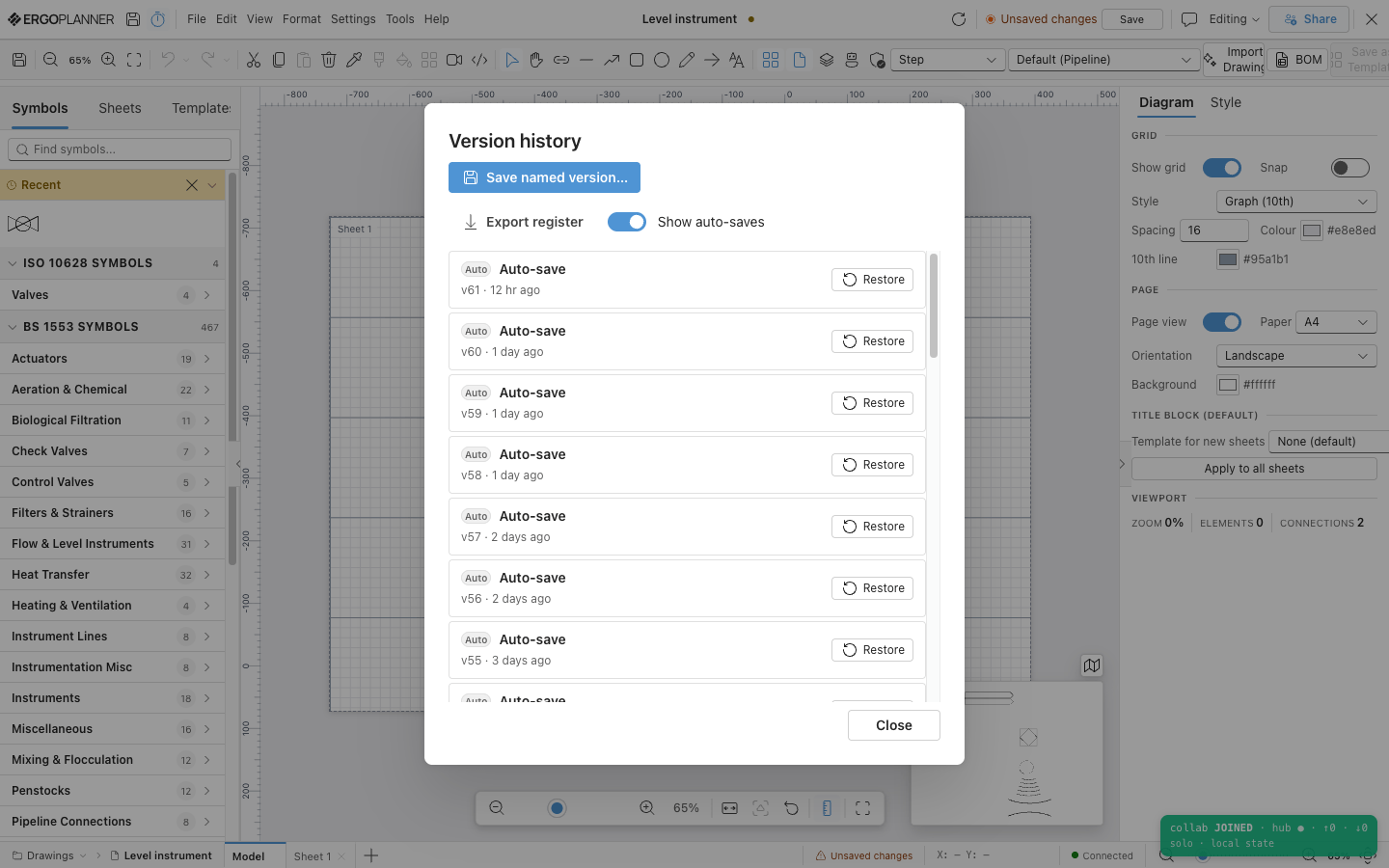
The version history of one drawing: named versions you mark yourself, auto-saves down to v55 three days ago, a Restore on each, and an exportable register.
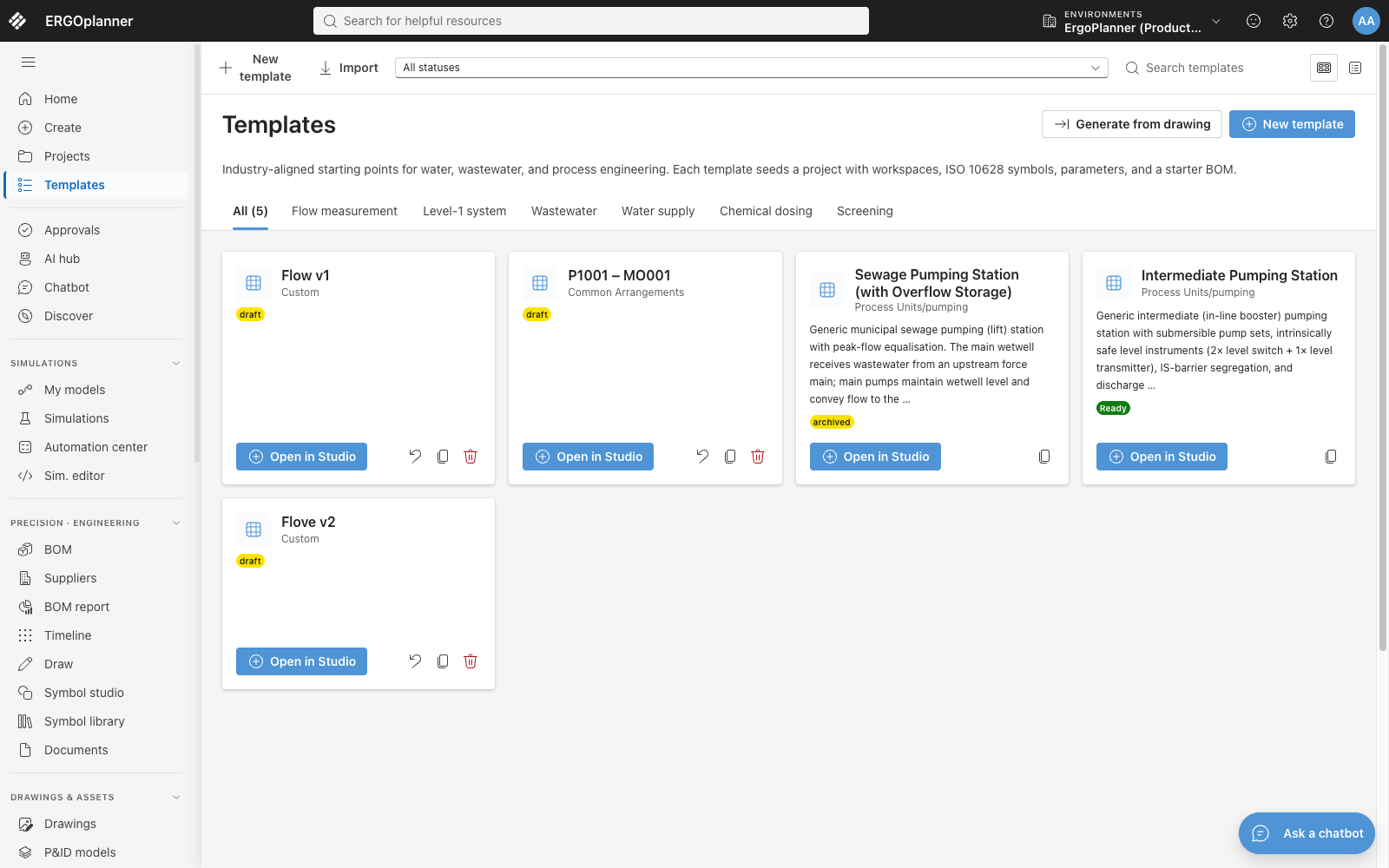
Templates filed by process category — flow measurement, wastewater, water supply, chemical dosing, screening — each with a draft, archived or ready status and an "Open in Studio" action. These are what beat 1 composes from.
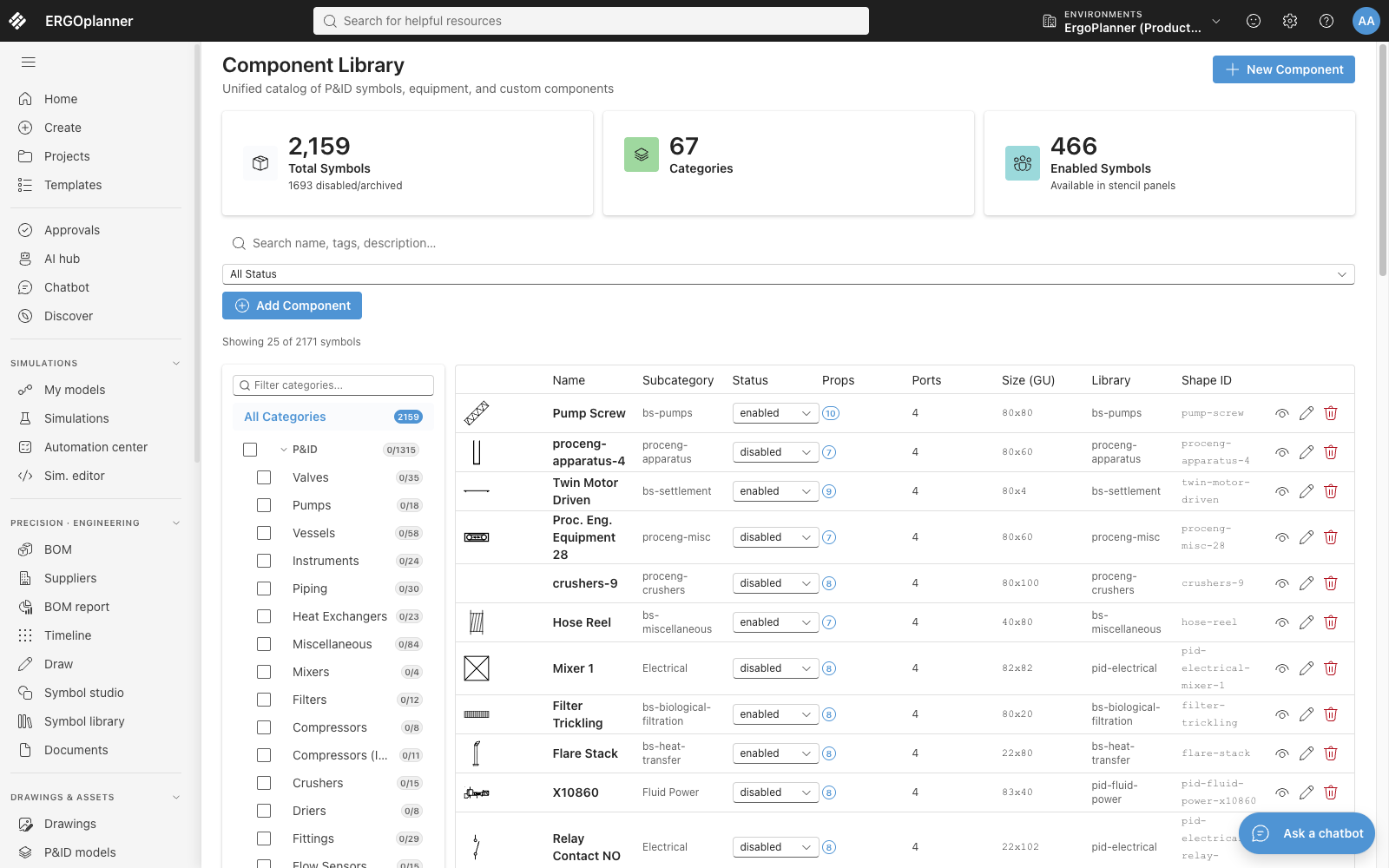
The component library as the demo tenant holds it: 2,159 symbol definitions in 67 categories, 466 of them enabled, each row carrying its ports, its property count and its size in grid units.
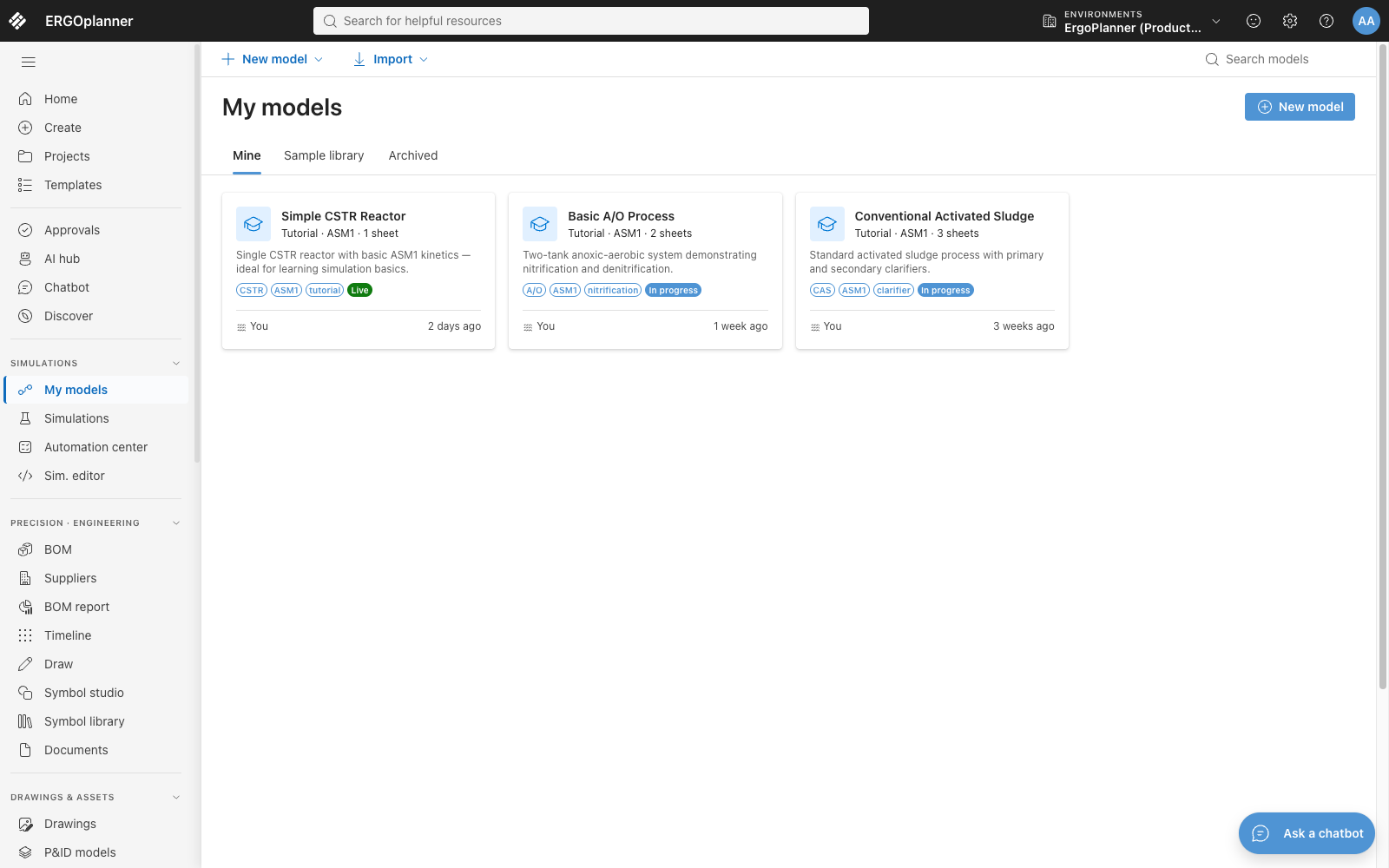
Three process models — a single CSTR, a two-tank anoxic-aerobic process and a conventional activated sludge process — each naming the biokinetic model it runs on.
/THE AGENTS/
Three engineering agents
that propose — you decide.
Three, and a test keeps it three. Nothing an agent returns is written to the model without your decision. The agents start on the Professional plan.
/WHO WE HELP/
We support engineering teams that rely on intelligent P&IDs to design, validate, and deliver.
Water & Wastewater
Treatment works, pumping stations, distribution networks. Equipment datasheets, costed bills of quantities, and HAZOP, LOPA, SIL, FMEA and DSEAR studies run against the P&ID. From feasibility through AMP delivery to decades of operational maintenance — one model for the entire asset lifecycle.
Industrial & Manufacturing
Production lines, facility services, and industrial processes. A tagged asset register from initial design through to operation, with a bill of materials that follows the drawing and a lifecycle record on every line that persists long after construction is complete.
Chemical & Process
Unit operations, recycle streams and dosing systems on one model. Mass balances closed across recycle loops, and HAZOP worksheets worked against nodes you define on the P&ID. Process simulation today covers water and wastewater treatment only.
Energy & Utilities
Power generation, gas distribution, renewable energy systems. One model from feasibility through as-built into operation, with every issue recorded as a transmittal, so the asset record carries through each upgrade cycle.
BUILT FOR ENGINEERS WHO DELIVER INDUSTRIAL PROJECTS
Most engineering platforms serve you during design and disappear at handover. We built Ergoplanner so the model lives with your plant — through construction, commissioning, operation, and into the next upgrade. Your engineering data should never have an expiry date.
Dimitris, Founder, Ergoplanner
Join engineering teams on the early access programme.
/GET STARTED/
Get your first project running in minutes
Easy to use — no training needed
/01/
Start from a template
Pick a pre-built process template — pumping station, dosing system, treatment train — and have a working P&ID model in seconds. Templates carry typical specifications and proven layouts built in.
/02/
Bring your existing project
Import the CAD you already own — DXF or DWG — and map its block table to your own symbols once; the mapping set is saved for the next import from the same library. The elements land tagged existing and retained, so what you add afterwards stays apart from what was already there.
/03/
Your team aligned from day one
Invite colleagues in seconds. Everyone works on the same live model — process, mechanical, electrical, and I&C engineers see each other's changes in real time with no version conflicts.
/FAQ/
Frequently asked questions
ErgoPlanner is an intelligent P&ID platform for engineering teams. It replaces the drawing-and-spreadsheet workflow with a structured engineering model — every piece of equipment, pipe, and instrument is a data-rich object. Change it once and every sheet, register and the bill of materials follow from the same model.
Two ways, and they are not equally certain. A DXF or DWG is read deterministically: the block table is already in the file, and you map each block name to one of your own symbols, and auto-detect preselects the best of your saved mapping tables. A PDF, scanned image or photo instead goes through the recognition pipeline, which is a preview: it proposes elements for review, and on real drawings those proposals are a starting point that needs checking, not a result. Either way an engineer accepts, adjusts or rejects each one, and nothing is written to the model until they do.
Traffic to the application is served over HTTPS, and the application reaches its database over TLS. Your projects are tenant-isolated by PostgreSQL row-level security, access is controlled by role-based permissions, and the operations that matter are written to a tamper-evident audit log. The database itself is not encrypted in the deployment we ship — the Security page says exactly where we stand. Read the Security page.
The application uses a conflict-free CRDT sync layer, so changes you make while offline are queued locally and merge automatically when your connection is restored. You can continue editing without interruption and without risk of losing work.
ErgoPlanner accepts PDF, PNG, JPG, TIFF, BMP, DXF, and DWG files. A multi-page PDF is run page by page for symbols only, and you choose which pages to process; a single sheet gets the full pipeline. A CAD file imports as live, editable elements; scans and PDFs are recognition previews whose proposals you review before they are placed.
Name a version at any milestone (e.g. "IFR Issue", "IFC Issue"), and an automatic revision is captured alongside as you work, at most every ten minutes. Restore any earlier version — the restore takes a backup first — and compare two revisions to see exactly what was added, removed or changed. The version register exports as CSV or JSON.
One platform. Every phase. Start today.
From feasibility through to operation — see how Ergoplanner's intelligent model and AI agents support your entire project lifecycle. Join engineering teams on the early access programme.